
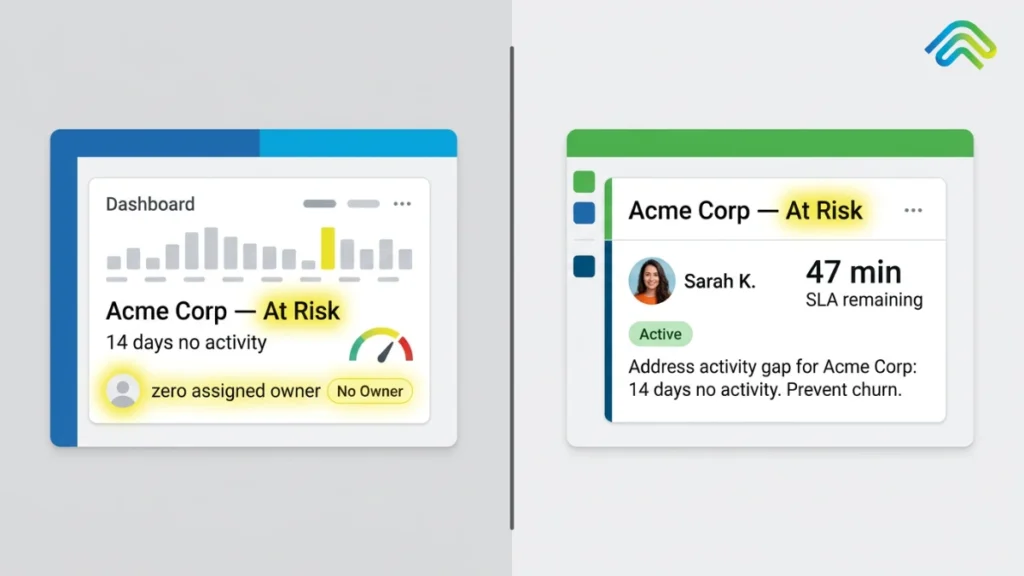
Why Dashboards Expose Problems but Don’t Fix Revenue
“The most dangerous dashboard is the accurate one that no one acts on. “Your Revenue Dashboard Isn’t Broken. That’s Exactly the Problem. There is a ghost that haunts the mahogany-row boardrooms of the Fortune 500 during every quarterly business review. Revenue leaders call it the Perfectly Accurate Disaster. Picture it: the BI team presents gleaming, real-time Tableau or PowerBI dashboards. The data is indisputable. It shows a 15% slippage in mid-market deal velocity, a stale pipeline in the EMEA region, and a rising tide of “no-decision” losses at the final stage. The dashboard is functioning with surgical precision, showing you exactly how, where, and why you are going to miss your year-end number. Three weeks later, nothing has changed. This is the central paradox every VP of Sales and CRO is living with right now: revenue dashboards don’t fix revenue. Perfect visibility does not produce corrective action. We have spent the last decade and billions in venture capital perfecting “Revenue Intelligence,” yet according to Gartner, a staggering number of B2B sales organizations still miss quota, not from a lack of data, but from an inability to act on it with speed and accountability.The hard truth most management consultants won’t say out loud: dashboards are diagnostic tools, not corrective systems. A thermometer tells you that you have a fever. It cannot synthesize penicillin. If your organization is relying on a dashboard to fix revenue, you are watching a GPS highlight that you are fifty miles off-route and expecting the screen to turn the steering wheel. What dashboards were designed to do? To understand why revenue dashboards don’t fix revenue on their own, you need to understand their lineage. Dashboards were born from Business Intelligence, a discipline designed entirely for reporting, not execution. The passive ledger vs. the active command center Historically, the CRM was designed as a system of record: a digital filing cabinet built for auditors and managers. Dashboards were layered on top to summarize that record. This created two fundamentally different operating models that most companies have never consciously chosen between. Most B2B organizations are deeply invested in the first model while desperately wanting the outcomes of the second. The Three CRM Dashboard Limitations Bleeding Your Pipeline In advising global GTM leaders, three recurring failure patterns surface with near-universal consistency. Together, they constitute what we call the Visibility Trap: the organizational condition of mistaking data transparency for operational rigor. Trap 1: Alert fatigue — the signal-to-noise crisis When everything is flagged as critical, nothing gets fixed. Modern CRMs are configured to flag a deal “red” if it hasn’t been touched in seven days. In a typical enterprise pipeline, this means a single sales VP is staring at 400 red deals on any given Monday morning. The result? The VP ignores the dashboard entirely. High visibility without prioritization creates cognitive paralysis. Without a system that separates noise from a genuine revenue-critical signal, the dashboard becomes background static. The most urgent deals dissolve into the same red gradient as dozens of healthy ones that just need a follow-up email. The CRM dashboard limitation here is structural: the tool was never built to rank urgency in real time. It reports equally on everything. Trap 2: Deal decay dashboard — stale data masking real risk A dashboard is only as accurate as the data entered by the least-motivated rep in your organization. If your team updates opportunities on Friday afternoon before a forecast call, your revenue dashboard is lying to you from Monday through Thursday. This is the deal decay dashboard problem, by the time a dashboard shows a deal is “stalled,” the deal has actually been dead for two weeks. The champion left the company. The competitor got a reference call. The budget got frozen. The dashboard doesn’t know. It’s still showing “Stage 3: Negotiation.“ McKinsey research indicates that companies automating data capture see material improvements in forecast accuracy, precisely because they eliminate this visibility lag. Relying on manual CRM updates is a structural recipe for revenue leakage in B2B that no reporting layer can solve. Trap 3: Insight without accountability — the bystander effect This is the most expensive trap. Because everyone can see the dashboard, there is a psychological assumption that someone is handling it. A high-value contract is stuck in legal review. It is visible on the “At-Risk Deals” dashboard. The AE thinks the Sales Manager is talking to Legal. The Sales Manager thinks the AE has it under control. The deal slips to next quarter. Both professionals are competent. The system failed them. Visibility does not assign ownership. A dashboard is a public square. An execution system is a direct assignment with a named owner, a deadline, and an escalation path if nothing happens. Why More Dashboards Make Revenue Leakage in B2B Worse, Not Better? When revenue growth slows, the instinct of enterprise leadership is to buy another tool, a “Single Pane of Glass” to unite all other panes of glass. This instinct is precisely wrong. Every new dashboard adds a layer of friction: According to Deloitte’s digital transformation research, the most successful revenue organizations are not the ones with the most tools, they are the ones with the highest Signal-to-Action Ratio. If you increase visibility (signals) without increasing capacity to act, you are not solving your revenue problem. You are increasing the stress level of your management team while the pipeline continues to leak. Revenue Visibility vs. Execution: The Distinction That Actually Matters To close the gap between seeing a problem and fixing it, GTM leaders must recognize that they are operating two fundamentally different categories of technology and most are only investing in one. Feature Revenue Visibility (Dashboards) Revenue Execution System (SpurIQ) Primary Goal Information & Reporting Action & Resolution User Experience Passive Observation (Reading charts) Active Participation (Triggered tasks) Data Flow One-way (System $\rightarrow$ Human) Bi-directional (Signal $\rightarrow$ Action $\rightarrow$ Result) Accountability Group-based (The team sees the risk) Individual-level (Assigned at the signal) Outcome “We know why we missed.” “We hit the number by