SpurIQ

AI Strategy

using ai for sales prospecting
Outbound & Prospecting, AI Strategy

AI Sales Prospecting in 2026: A Practical Guide for B2B Teams

The reality of B2B sales in 2026 is unyielding: AI for sales prospecting has shifted from a cutting-edge competitive advantage to the absolute baseline for revenue survival. According to the Salesforce State of Sales 2025 report, 81% of sales teams are actively using or experimenting with artificial intelligence tools in their prospecting workflows. The debate is no longer about whether to invite algorithms into your go-to-market (GTM) strategy – it is about how to deploy sales prospecting AI without driving your conversion metrics off a cliff. Here lies the modern paradox. High-performing AI prospecting  tools have made it 10x faster to scrape a list, enrich a contact record, map a target account, and spin up a highly personalized message. Yet, the Instantly Benchmark Report reveals that B2B cold email reply rates have plummeted to an all-time low of 3.43%. We have entered the era of “more AI, fewer replies.” When scaling outreach becomes effortless via modern AI prospecting tools, the buyer’s inbox simply becomes a battlefield of automated noise. This comprehensive playbook is built for Heads of Sales, RevOps leaders, SDR Managers, and founders who are ready to move past the superficial hype. You will discover exactly how modern AI for sales prospecting operates in 2026, mapping out the four operational stages where intelligence creates real leverage, analyzing the structural traps that stall mid-funnel pipeline, evaluating specialized software, and uncovering the missing execution layer that separates market leaders from the rest of the pack. What Is AI for Sales Prospecting? Enterprise AI for sales prospecting is the systematic application of artificial intelligence – specifically machine learning models, natural language processing (NLP), and large language models (LLMs) – to automate or significantly augment the operations of identifying high-fit prospects, gathering structured account intelligence, enriching contact data, and generating contextual outbound outreach at scale. In practice, modern sales prospecting AI collapses activities that used to consume hours of manual SDR labor into a series of instantaneous background processes. Instead of a rep spending an entire afternoon cross-referencing LinkedIn profiles, corporate balance sheets, and tech-stack registries, a sales prospecting AI engine handles it instantly. This transitions outbound prospecting from a brute-force volume play to a game of surgical precision. Instead of removing the human, deploying an optimized architecture for AI for sales prospecting is designed to strip away the repetitive administrative burden that routinely buries a senior rep’s strategic insight. Why the Shift Happened Three macroeconomic and technical factors converged to make this playbook essential: The Four Stages Where AI Delivers Real Lift A highly functioning B2B prospecting engine relies on a clean, predictable workflow. Implementing tailored AI prospecting tools across these four core stages yields quantifiable efficiency gains, provided you understand where the technology excels and where its boundaries lie. Stage 1: List Building & ICP Targeting When assessing AI for sales prospecting, look first at target identification. Rather than relying on manual, static filters, machine learning algorithms analyze your historical closed-won data to identify look-alike accounts. These AI prospecting tools automatically score accounts based on firmographic fit, technographic alignment, and active intent, dynamically building lists that adapt as market conditions change. Stage 2: Account & Contact Research This stage uses intelligent agents built into premium AI prospecting tools to comb through unstructured web data – quarterly earnings reports, leadership shakeups, active job postings, technology adoptions, and public press releases. The underlying sales prospecting AI synthesizes these disparate data points into a crisp, 1-to-2 paragraph account brief for the rep. Stage 3: Personalized Outreach Generation Modern LLM orchestration engines analyze the gathered account intelligence alongside the prospect’s profile to generate hyper-contextual multi-channel sequences. These advanced AI prospecting  tools automatically engineer specific variants to support continuous, algorithmic A/B testing. Stage 4: Signal Detection & Trigger-Based Outreach Algorithms within sales prospecting AI software continuously monitor external digital environments for explicit buying signals, such as leadership changes, new rounds of funding, specific pricing page visits, or sudden surges in technical job openings. The system surfaces these triggers to initiate an outreach workflow the moment the signal is registered. The Trap Most Teams Fall Into When sales organizations scale up their use of AI tools for prospecting, build extensive lists, and deploy automated personalizations, they often find that their aggregate pipeline metrics stall or drop. When this happens, revenue leaders frequently blame the software. However, the problem rarely lies within the tools themselves. Instead, it stems from four systemic operational traps. Trap 1: Volume Inflation Because implementing AI for sales prospecting makes it remarkably simple to launch personalized messages, organizations fall into the trap of multiplying their total output. Unfortunately, as every team scales their volume via automated AI prospecting tools, the market experiences severe inbox saturation. According to Sopro 2026 data, the average B2B decision-maker now receives more than 120 cold emails every single week. Pumping out a higher volume of messages into an already overcrowded ecosystem simply accelerates buyer fatigue and triggers spam filters. Trap 2: Personalisation Theatre Sophisticated B2B buyers have developed a keen eye for automated personalization patterns generated by basic sales prospecting AI platforms. An opening line like: “Hi Sarah, I noticed your team at EnterpriseCorp just raised its Series B and is expanding the engineering team…” may be accurate, but it reads instantly as a boilerplate template populated by an AI script. When personalization feels performative rather than genuinely consultative, prospective buyers tune out. Trap 3: Stopping at the Email The vast majority of automated outbound workflows terminate the moment the initial message is sent. They lack a mechanism to manage subsequent, contextual engagement. According to research by the RAIN Group, 52% of sales professionals fail to follow up a second time. While AI for sales prospecting software might help your team craft a strong first touch, a broken follow-up process prevents you from capturing the value of that initial contact. To see how to optimize these multi-touch touchpoints, teams must learn how to refine their sales call follow up email cadences across the entire pipeline journey. Trap 4:

sales call follow up email
AI Strategy

Sales Call Follow-Up Email: 12 Templates and Scripts That Actually Win Deals (2026 Guide)

You just got off a great sales call. The buyer was engaged. They leaned in when you showed them that specific workflow. They asked good, probing questions about implementation. You mutually agreed on the next steps, smiled, and ended the Zoom meeting. Now you are back at your desk, staring at your inbox, and you have exactly 30 minutes before your next scheduled call. What you do in those next 30 minutes will fundamentally decide whether this deal closes or quietly dies in the pipeline. If you have been searching for exact frameworks on how to write follow-up email after sales call meetings to keep momentum alive, this guide is your answer. The data on post-call behavior is staggering. According to internal studies at SpurIQ, 52% of sales reps never follow up twice. Worse, the buyer’s memory of your call decays rapidly. Applying the Ebbinghaus forgetting curve to B2B sales reveals that your buyer will forget roughly 50% of your conversation within 24 hours. However, reps who send a highly relevant follow up email after sales call wrap-ups within 30 minutes see 2.4x higher reply rates compared to those who wait until the next day (Sopro 2026). This guide isn’t about the vague philosophy of “staying in touch.” It is an execution manual. A high-converting sales call follow up email is a strategic asset. Below, you will find 12 tailored templates organized by exact scenarios-from post-discovery to stalled deals. You will also get the timing framework that dictates which template wins, the subject lines that actually get opened, and a breakdown of the critical mistakes that kill follow-ups before they are even read. Why Most Follow-Up Emails Fail Before you copy and paste a template, you need to understand why your current follow-ups are being ignored. Modern buyers are inundated with automated cadences and generic check-ins. Your sales call follow up email strategy has to stand out. If your email falls into one of these five failure patterns, it will be archived instantly. The 5 Failure Patterns Every template in this guide is built to structurally address Failures 1 through 4. Failure 5-the very real problem of emails simply not getting sent-is a structural workflow issue, and we will come back to how top teams solve it in the final section of this guide. 12 Sales Call Follow-Up Email Templates That Win Deals This is the core of your execution strategy. Below are 12 follow up sales call script examples, mapped to specific scenarios in the sales cycle. Every follow up script for sales calls below is designed to be copied, pasted, and adapted. Always replace the bracketed information [Like This] with highly specific details from your call. Template 1: Post-Discovery Call – The Standard Recap Scenario: You just finished a discovery call. The buyer was engaged, shared some pain points, but no concrete, calendar-booked next step was committed to on the call. When to send: Within 30–60 minutes of the call ending. Subject line: Recap from our call + next steps Why it works: This template relies on the rule of three. By listing three highly specific details they shared, you prove active listening. Proposing one concrete next step removes the decision-making burden from the buyer. Finally, the “safety valve” at the end reduces resistance and invites a low-pressure correction, which often sparks a reply. In B2B SaaS contexts, variations of this framework yield 35–45% reply rates. Template 2: Post-Discovery Call – The Pain-Anchored Recap Scenario: During discovery, the buyer expressed clear, distinct pain but seemed highly hesitant about the urgency or the effort required to change. When to send: Within 60 minutes of the call ending. Subject line: Cost of waiting on [their specific challenge] Why it works: It addresses their hesitation head-on, which builds immediate trust. Instead of pitching features, it reframes their inaction as a tangible cost, creating urgency without applying aggressive sales pressure. Template 3: Post-Discovery Call – The No-Decision Save Scenario: The discovery call ended with the dreaded phrase, “Let us think about it and get back to you.” This is a classic indicator of a no-decision outcome. When to send: Within 2 hours of the call ending. Subject line: Two questions before you decide Why it works: It reframes “I need to think about it” from a stall tactic into a structured internal decision exercise. By stating “Either answer is fine,” you signal massive professional confidence and detach from the outcome. Template 4: Post-Demo – The Standard Recap with Proof Scenario: You delivered a standard product demo to multiple stakeholders. The demo went well, objections were handled, and it is time to solidify next steps with a tailored follow up email after sales presentation. When to send: Within 30 minutes of the demo ending. Subject line: Demo recap + the one thing I’d revisit Why it works: This executes perfect multi-threading by CCing all stakeholders, keeping the whole buying committee aligned. It intentionally highlights the area of pushback rather than sweeping it under the rug, providing immediate proof/resources to resolve it. Template 5: Post-Demo – The Champion-Activation Email Scenario: During a group demo, one specific person was clearly the most engaged. They asked the smartest questions and seemed to grasp the value immediately. This is your potential champion. When to send: Within 60 minutes of the demo ending. Subject line: Quick thought on what you said about [specific topic] Why it works: Champion activation is arguably the highest-leverage move in modern B2B sales. This email validates their intelligence, which drives internal commitment. Template 6: Post-Proposal – The Confident Close Scenario: The proposal has been sent. The buyer has had it for 3 to 5 days, and the once-active conversation is starting to slow down. When to send: 3–5 business days after the proposal was sent. Subject line: Where are we? Why it works: This is the highest-converting check-in pattern in modern sales. It is highly direct without crossing the line into aggression. By explicitly naming three plausible scenarios, you give the buyer

what is revenue operations
Revenue Operations, AI Strategy

What is Revenue Operations? The Complete 2026 Guide for B2B Teams

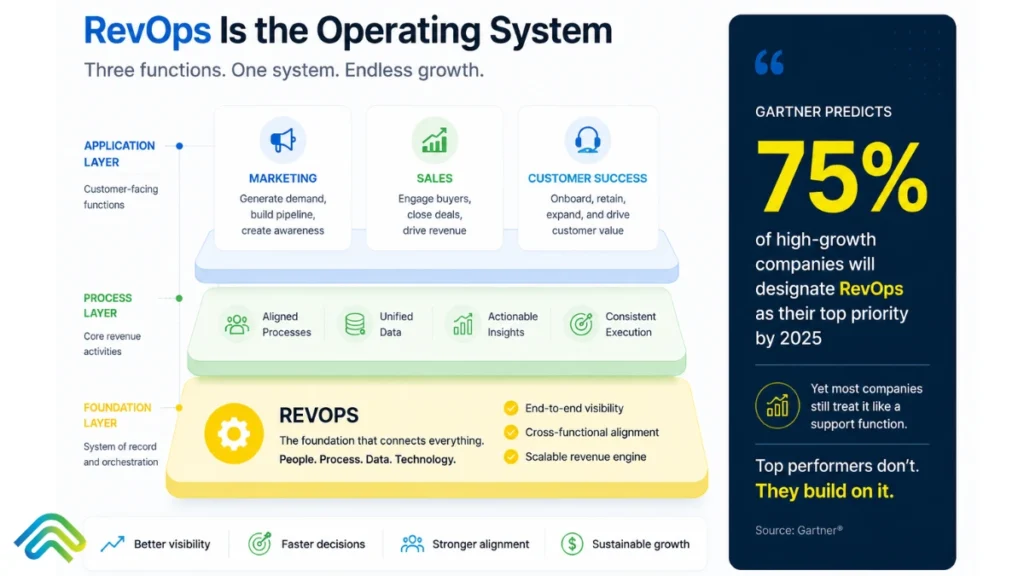
A Series B founder hears the phrase “revenue operations” three times in a single week. Once, a board member asked why the forecast keeps missing. Once on a podcast where a CRO credits RevOps for a successful IPO. And once from a recruiter pitching a VP RevOps hire as the solution to every GTM problem. Each person used the same two words. Each meant something slightly different. The founder walks away more confused than before, wondering whether RevOps is a real function, a philosophy, or simply the latest B2B buzzword. Here is the answer: revenue operations is a real, measurable function, and the data on its impact is unambiguous. Companies with mature RevOps grow revenue 19% faster. Organisations that achieve cross-functional alignment see 36% higher revenue growth and 28% higher profitability, as per Forrester. And public companies with strong RevOps programmes outperform peers by 71% in stock performance over five years. This guide answers four questions in order: what RevOps is, why it emerged when it did, how it actually works, and whether your team needs it. It is the foundational reference. If you want the implementation framework, the full strategy guide is at /revenue-operations-strategies. What is Revenue Operations?  Revenue operations (RevOps) is a B2B business function that aligns sales, marketing, and customer success teams around shared revenue accountability, with shared data, shared metrics, and shared execution standards.  This revenue operations definition holds across several companies, GTM motion, and industry: RevOps is the operating system underneath the revenue function, not a tool, a title, or a department rename. Where sales, marketing, and customer success have historically operated as three separate teams with three separate targets, three separate dashboards, and three separate definitions of success, RevOps consolidates them into one coherent system. The goal is simple: to drive revenue growth by eliminating the friction that siloed teams create across the entire customer journey.  What RevOps Does  What RevOps is NOT Common synonyms: Revenue operations strategy, RevOps function, revenue operations team. “Ops revenue” is sometimes used as shorthand but is technically inverted and best avoided in professional contexts.  Why RevOps Emerged: A Brief History RevOps didn’t appear overnight. It evolved in direct response to how B2B selling broke, scaled, and demanded more. Here is how the function evolved, year by year, from a fragmented back-office role to a boardroom priority. Sales ops, marketing ops, and customer success ops existed as separate functions. Each owned its own metrics, tooling, and pipeline version. Forecasts didn’t reconcile across functions. Handoffs broke routinely, and nobody owned the gaps. SaaS companies began consolidating these three ops revenue functions into a single team to solve the handoff problem. The label “revenue operations” became dominant around 2017 to 2019. Salesforce, HubSpot, and Outreach all formalised RevOps roles during this period. RevOps mainstreamed during the SaaS boom. The function exploded in headcount as companies scaled fast and needed cross-functional discipline to manage growth without chaos. Average RevOps team sizes roughly doubled. Capital efficiency stopped being optional. Median CAC payback stretched to 20 to 23 months (Benchmarkit 2025), more than double the previous benchmark. RevOps became the function responsible for delivering the efficiency that investors were now demanding. With a sharper focus on customer acquisition cost, net revenue retention, and annual recurring revenue as the primary indicators of health.  AI-driven execution emerged as the missing layer. The strategy frameworks were largely solved. The execution gap, the distance between a RevOps plan and reliable rep behaviour, became visible. The teams that closed it pulled away from the rest. By 2026, 75% of B2B SaaS leaders name RevOps as a top-3 strategic priority (Gartner 2025). The Scope of Revenue Operations Understanding what RevOps owns versus what adjacent functions own is where most organisations get confused. Blurring these boundaries leads to duplicated effort, unclear accountability, and a RevOps leader who ends up as a catch-all inbox for GTM problems nobody else wants to own.  What RevOps Owns Shared ICP, shared lifecycle definitions, and shared metrics across sales, marketing, and CS. RevOps is the function that forces three teams to agree on what “qualified” means, what “closed” means, and what “at risk” means, before those terms appear in a board deck. A single source of truth in the CRM, integrated with marketing automation platforms, sales engagement, CS platforms, billing/ERP, and product usage data. RevOps does not just own the CRM; it owns the logic that connects everything to it. Lifecycle stages, qualification frameworks, handoff SLAs, deal desk management, RACI matrices, and governance rituals. These are the behaviour standards that make the rest of the function operational rather than theoretical. Forecasting, attribution, capacity planning, territory design, compensation plan input, and board-level revenue reporting. RevOps translates pipeline data into the language leadership uses to make decisions. CRM administration, GTM tool selection, integration design, and data warehouse decisions. RevOps owns the system, not just the tools inside it. What RevOps Does NOT Own The Four Pillars of Revenue Operations Every mature RevOps function is built on four pillars. Each one is described here at a conceptual level. The revenue operations framework below is the conceptual foundation. Let’s have a look: Shared definitions, metrics, and accountability across sales, marketing, and CS. The work of getting three functions to operate as one coherent revenue system. Without this pillar, every other investment in data, process, and tooling collapses into siloed efforts that never reconcile. A single source of truth, integrated tooling, and working attribution across the full funnel. This is the plumbing under everything else. The scale of the problem is often underestimated: 45% of B2B contacts are never logged in CRM today (Salesforce 2025). Customer data quality is the foundation of everything that follows. Fixing this is most of the foundational work.  Documented playbooks, qualification frameworks, lifecycle stage definitions, and governance rituals. The behaviour standards that make consistency possible across reps, quarters, and GTM motions. Without this pillar, alignment becomes aspiration rather than operation. The system that turns the first three pillars into reliable behaviour at the precise moment

revenue ops vs sales ops
Revenue Operations, AI Strategy

Revenue Operations vs Sales Operations: Understanding the Key Differences and Choosing the Right Strategy

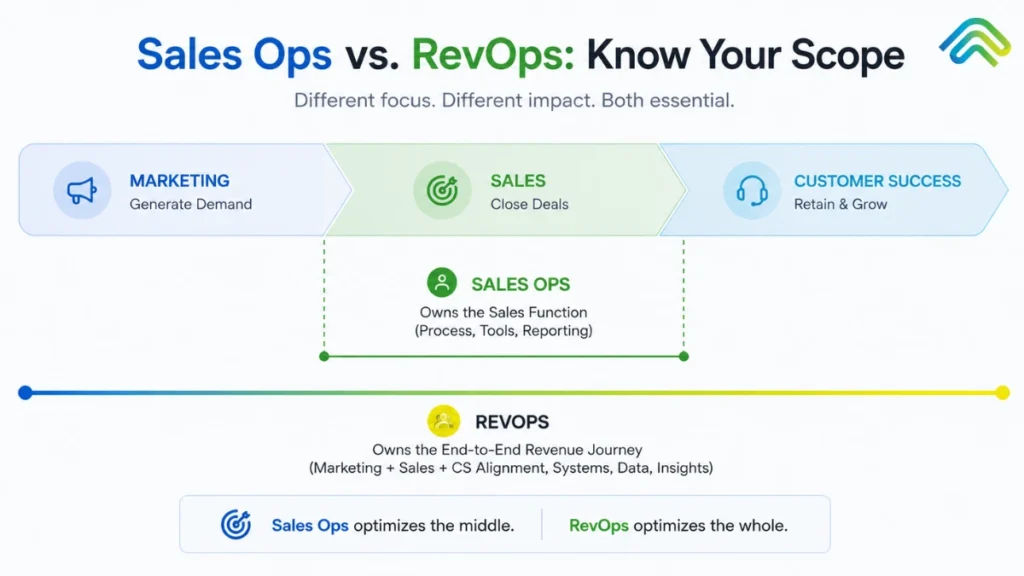
If you’re a Series B founder sitting at your desk, reviewing two resumes your recruiter just forwarded, you might be asking yourself the critical question of revenue ops vs sales ops. The first profile is a “Sales Operations Manager” and the second one a “Revenue Operations Lead.” Both candidates boast about improving CRM hygiene, tightening forecast accuracy, and optimizing the tech stacks that support your business operations. You have a critical decision: which function does the business actually need to scale sustainable growth and drive predictable revenue growth? Since 2022, search volume for “revops vs sales ops” has tripled, reflecting widespread confusion across B2B SaaS companies striving to align their sales functions and customer success processes. As businesses scale past early startup stages, the cracks in their go-to-market motions start to show, and leadership reflexively looks to operations professionals to fix them. However, most resources answer this query as a simple glossary definition. The real question isn’t just what these terms mean – it is which function your specific business needs, when to hire for it, and how to evolve your operational structure to maximize annual recurring revenue and improve customer retention. This guide breaks down exactly what you need to know. We will cover: So, without wasting time, let’s dive into the blog! What Is Sales Operations? Sales operations, often simply referred to as sales ops, is the functional backbone designed to improve the productivity, efficiency, and effectiveness of the sales team specifically. While it originated in the 1970s with Xerox’s pioneering efforts, it matured into a standard sales department pillar by the early 2000s as CRMs became the “system of record.” The sales operations team focuses on the “how” of selling. They are the mechanics of the overall sales engine, ensuring that sales representatives aren’t bogged down by friction. Their key functions and core responsibilities include: Typically, sales ops professionals report to a VP of Sales or a Chief Revenue Officer (CRO). In the traditional model, this function sits firmly inside the sales org. When sales operations initiatives are successful, you’ll see a direct impact on sales performance: sales reps spend less time on administrative tasks, sales productivity climbs, and sales metrics like forecast accuracy finally stabilize. The sales team begins to operate as a productive engine, rather than a collection of individual heroes. However, there is a historic limit: sales ops focuses almost exclusively on the sales funnel from the moment a lead is qualified until the deal is won. It doesn’t own the customer journey before the SQL handoff, nor does it manage existing customers after the closing deals phase. In this siloed model, marketing and customer success run their own ops in parallel, and the handoffs between them are frequently where revenue leaks occur. What Is Revenue Operations? Revenue operations, or RevOps, is the strategic function that aligns sales, marketing, and customer success around shared revenue accountability. While sales ops is primarily about the sales reps, a revenue operations team is obsessed with the entire customer journey. Revenue operations vs sales isn’t just a rebranding. This function emerged between 2017 and 2019 and became mainstreamed during the 2020–2022 SaaS boom when companies realized that “growth at all costs” was no longer a viable strategy. A revenue operations strategy focuses on the full revenue generation lifecycle. Rather than looking at a single department, RevOps looks at the entire buyer journey. Core responsibilities include: Who reports into RevOps? Usually, a Chief Revenue Officer or a COO/CEO. RevOps spans the organization rather than sitting inside any one department. The goal of successful revenue operations is to ensure that revenue teams operate as one cohesive system. Why did RevOps emerge so rapidly? The SaaS economics that made strategic alignment optional in the 2010s broke. Capital efficiency stopped being a suggestion and became a requirement. With customer lifetime value (CLV) becoming the primary metric of company health, businesses realized they couldn’t afford a disjointed customer experience. According to Benchmarkit (2025), median CAC payback has stretched to 20–23 months. Companies that couldn’t make their marketing teams, sales teams, and customer success departments operate as one fell behind. Forrester reveals that companies with mature RevOps functions grow revenue 19% faster and achieve 15% higher profitability than their peers.  Key Differences Between RevOps and Sales Ops The main difference is scope. Sales operations is a specialized tool; Revenue operations is the entire toolbox. While sales ops focuses on the sales cycle length and rep behavior, RevOps looks at market trends and customer success metrics to see how the top of the funnel impacts the bottom. Dimension Sales Operations Revenue Operations Operational Scope Exclusively sales-focused. Supports SDRs, Account Executives, and Sales Leadership. Cross-functional. Encompasses Marketing, Sales, and Customer Success teams. Core Problem Solved Inefficient sales cycles, low rep productivity, and poor pipeline visibility. Misaligned departmental silos, leaky handoffs, and unpredictable revenue growth. Reports To VP of Sales or Chief Revenue Officer (CRO). Chief Revenue Officer (CRO), Chief Operating Officer (COO), or directly to the CEO. Primary Metrics Quota attainment, win rate, sales cycle length, pipeline coverage. Net New ARR, Net Revenue Retention (NRR), CAC payback, Customer Lifetime Value (CLV). Data Ownership Sales pipeline data. Focuses on CRM opportunity stages and individual rep activity metrics. Full-funnel unified data. Tracks the journey from anonymous website visitor to multi-year renewal. Tooling Focus CRM architecture, sales engagement (sequencing), and forecasting/pipeline dashboards. Integrating the CRM, marketing automation, CS platforms, and centralized BI/analytics. Process Scope Active sales motion only. From opportunity creation to the Closed-Won handshake. End-to-end lifecycle. From top-of-funnel lead generation through customer satisfaction retention and expansion. Forecasting Approach Sales-only forecast. Based on active opportunities, pipeline coverage, and historical rep win rates. Revenue-wide forecast. Combines new sales pipeline, expected cross-sell/upsell expansion, and projected churn. Attribution Model Pipeline-stage or single-touch. Focuses on last-touch or “opportunity source” (e.g., cold call vs. inbound). Multi-touch attribution. Sophisticated models (W-shaped, U-shaped) tracking all touches across the buyer journey. Customer Success Ops Strictly outside of scope. A core pillar of the function, ensuring smooth

revenue operations strategies
Revenue Operations, AI Strategy

Revenue Operations Strategies That Actually Work in 2026: The Four-Pillar Framework for Predictable B2B Growth

Every working RevOps strategy eventually faces the same uncomfortable truth. Most B2B revenue operations strategies don’t fail because the framework was wrong. They fail because the framework never made it out of the wiki. In 2025, SpurIQ fixed a Series C SaaS company that missed its Q2 ARR target by 18%. They had world-class RevOps dashboards, clean CRM data, and documented playbooks in Notion. The problem wasn’t strategy. The problem was that reps weren’t consistently following through on signals, and nobody noticed until the quarter was already lost. This is the execution gap that kills revenue operations strategies. Most B2B companies in 2026 don’t suffer from a lack of frameworks, they suffer from “slideware strategy” that lives in wikis and decks but never makes it into daily workflows. A strategic framework is essential for aligning teams such as marketing, sales, and finance, driving cohesive growth, and streamlining processes. Organizations often face communication breakdowns between departments, which can impede growth and lead to missed opportunities. A dedicated revops team is crucial for streamlining revenue-related processes, improving workflows, and ensuring compliance across functions. Business leaders play a key role in facilitating strategic execution, accountability, and cross-functional management within revenue operations. By Q1’s end, even the most sophisticated plans have decayed into good intentions. The distinction matters: system-embedded strategy means playbooks wired directly into tools and triggers. Revenue operations strategy must extend beyond alignment and metrics into an execution layer that turns every insight into a tracked action. This guide walks through the four pillars that separate RevOps strategies that compound from RevOps strategies that stay theoretical. The first three pillars are well-trodden ground; alignment, data architecture, process discipline. The fourth, the execution layer, is where the winning teams have started spending their attention in the past eighteen months. It’s also where most teams are still leaking revenue without realising why. What a Revenue Operations Strategy Actually Means A revenue operations strategy is an operational blueprint for how revenue is generated, monitored, and improved across the entire customer lifecycle. It’s not just about org charts or team structure. It’s a set of decisions about data management, processes, governance, and execution spanning marketing, sales, customer success teams, and finance. The key components of a revenue operations strategy include data, metrics, and analytics, which are essential for accurate sales forecasting, reporting, and performance tracking. The scope includes lead routing rules, ICP and qualification standards, lifecycle stages, handoff SLAs, compensation guardrails, and feedback loops from first touch to renewal. A revenue operations strategy connects teams, systems, and processes to ensure effective execution of go to market plans, allowing every function to work from the same structure and definitions. Integrating and sharing accurate customer data across marketing and sales tools is crucial for better decision-making and delivering seamless customer experiences. This contrasts with traditional go to market strategy, which focuses on who you sell to, what you sell, and why it matters. Revenue operations strategy answers the “how”: how does the system actually run day to day, and what happens when it doesn’t? Establishing clear principles helps reinforce the decision making process and shapes the company’s culture and structure. A well-structured revenue operations strategy provides a framework that defines how teams interact, what systems they use, and how information flows between groups. Successful revenue operations strategies can enhance collaboration across departments by aligning revenue teams around shared goals, breaking down silos, and improving the buyer experience. This alignment can be achieved through regular meetings and collaborative projects. Avoiding poor customer experiences is a critical goal, as managing the entire customer journey ensures a seamless experience and prevents revenue loss. Here’s a concrete example: in 2024, a B2B infrastructure startup cut their quote-to-close cycle from 56 to 34 days by redesigning approval workflows and SLAs under a unified RevOps strategy. Revenue operations strategies can lead to predictable business growth by ensuring consistent inputs, shared systems, and repeatable actions. Governance and processes are supported by business rules, with automated checks helping maintain compliance standards and protect profit margins. Also Read: Deal Risk Scoring: How AI Detects Stalled Deals Before Leadership Notices The 4 Pillars of a Working RevOps Strategy Most mature RevOps models converge on four practical pillars that connect strategy to outcomes. These pillars transform abstract alignment into measurable results. Today, a new framework—such as the CAT4 framework—replaces fragmented processes with centralized, real-time visibility and accountability, enabling better decision-making and operational excellence. The four pillars are: Pillars 1–3 dominated RevOps content and tooling from 2018–2024. But pillar 4, the Execution Layer, is where outperformance comes from in 2026. Companies can have clean CRMs but inconsistent follow-up. Detailed playbooks that reps don’t use. Great board metrics that don’t change field behavior. Implementing standardized processes and clear ownership within teams can significantly enhance collaboration and ensure all departments are aligned towards common goals. Marketing operations, in particular, transforms marketing from a cost center into a revenue driver by connecting every campaign directly to business outcomes, ensuring that marketing efforts contribute to growth. Pillar 1 — Data Management and Systems Foundation The data foundation establishes a single source of truth for all revenue operations. Without it, every downstream process breaks down into data silos and conflicting reports. Integrating customer data across marketing and sales tools is essential for providing real-time insights that drive better decision-making and personalized engagement. What belongs in this pillar: In 2025, a PLG SaaS company unified Segment events, Stripe billing, and Salesforce into a single account 360 view. This enabled usage-based expansion plays that lifted NRR by 15–20%. Coordinating efforts across multiple departments ensures seamless data flow and campaign execution, supporting consistent processes and resource management. The non-glamorous work matters most: deduplication (often reducing 15–25% duplicates), enrichment rules, field governance (RevOps approves new fields to prevent sprawl), and change management for new integrations. The adoption of new systems streamlines revenue operations and improves forecasting accuracy. Automating routine tasks and repetitive tasks in these processes improves workflow efficiency and frees up time for strategic activities. Pillar 2

deal risk scoring
AI Strategy, Revenue Operations

Deal Risk Scoring: How AI Detects Stalled Deals Before Leadership Notices

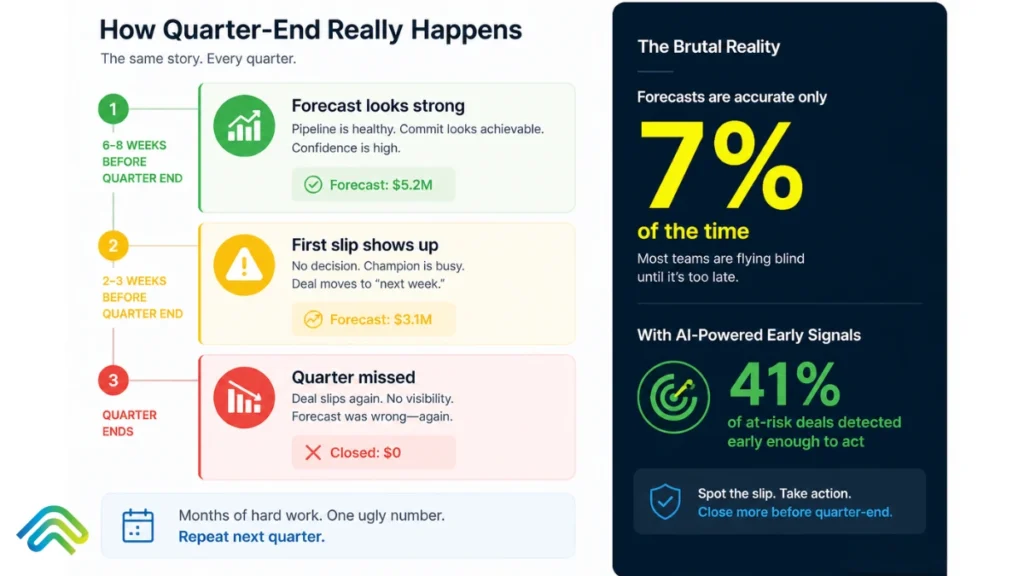
It’s the second Friday of the third month of the quarter. Your forecast says you’ll hit 102% of the plan. By the following Wednesday, three deals have slipped to next quarter. By Friday, that’s seven. The forecast was built on rep optimism, last week’s activity logs, and a CRM that updated when someone remembered to update it. Nobody saw the deal stall. Nobody could. Your VP Sales says it’s a timing issue. The reps say the buyer went quiet. The CRO knows what really happened: the deals were dying for weeks. Nobody had the system to see it. This quarter-end scramble is a universal pain point, and the data proves it. Only 7% of sales organizations achieve 90%+ forecast accuracy (Gartner Research). The median sits dangerously at 70–79%, and 69% of sales operations leaders say forecasting is becoming harder, not easier. Meanwhile, AI deal risk scoring – when properly implemented – flags at-risk deals 41% earlier than manual reviews and identifies up to 89% of deal failures before they happen. In this guide, we will break down exactly how this works. We will cover what deal risk scoring actually is, the hidden signals AI tracks that humans consistently miss, the proven framework for implementing it, and what separates the platforms that simply score risk from the platforms that actually save deals. What Is Deal Risk Scoring? (And Why Static Scoring Stopped Working) Deal risk scoring is a data-driven, systematic method for evaluating the health of sales opportunities. It assigns a numerical score to each open deal based on weighted indicators of risk, moving forecasting away from subjective rep gut-feel to an objective, evidence-based assessment. To understand where we are today, you have to look at the three generations of scoring approaches: Generation 1: Rep Gut-Feel Forecasting (1990s–2010s) For decades, forecasting relied on salespeople assigning probability percentages to deals (“I feel 70% confident this will close”). Managers would interrogate these numbers weekly in pipeline reviews, adjusting them up or down based on experience. The forecast accuracy rarely broke 50–60%. The core failure mode here is human nature: account executives are systematically, inevitably over-optimistic about their own deals. They have to be to survive in sales, but that optimism destroys pipeline predictability. Generation 2: Rule-Based CRM Scoring (2010s–early 2020s) As CRMs matured, RevOps teams tried to enforce logic. They built rule-based automation: If a deal has been in Stage 3 for 30 days, reduce probability by 10%. If there has been no logged activity in 14 days, flag the deal as yellow. While a step forward, this approach was brittle. It relied entirely on reps manually logging data. Reps quickly learned to “game” the system by sending a meaningless check-in email simply to reset the 14-day activity timer, creating a false sense of deal health. Generation 3: AI-Driven Deal Risk Scoring (2024–2026) Modern deal risk scoring doesn’t ask the rep for input; it passively ingests truth. AI models connect directly to the execution layer – email inboxes, calendar systems, Zoom recordings, and marketing engagement platforms. It analyzes the unstructured data (what the buyer is actually saying and doing) to assess risk objectively, in real time. Why the shift matters now: By 2026, over 60% of B2B sales teams use ML-derived intent and risk scoring as a core component of pipeline qualification (Gartner Market Prediction for Revenue Intelligence Platforms). The shift from rep self-reporting to evidence-based scoring isn’t a future trend – it is the new baseline for any competitive revenue organization. How AI Actually Detects Stalled Deals (The Six Mechanisms) The reason AI vastly outperforms human managers in pipeline reviews isn’t magic; it is processing capacity. A sales manager can review the last three emails on a deal. An AI model can review the last three years of successful deal patterns and cross-reference them against every micro-interaction happening today. Here are the six mechanisms AI uses to detect risk: Mechanism 1: Engagement Velocity Tracking AI doesn’t just look at whether an email was sent; it looks at the pace of the response. If a prospect historically replies to emails within 4 hours, and that response time slowly stretches to 12 hours, then 24 hours, then 48 hours – the AI flags the velocity decay weeks before the rep realizes they are being ghosted. Mechanism 2: Multi-Threading Analysis Enterprise deals require consensus. AI maps the communication graph to identify single-threaded vulnerabilities. If a $150K software deal only features back-and-forth communication with a mid-level manager, and the VP or IT Director hasn’t been cc’d or attended a meeting in three weeks, the AI spikes the risk score. It knows the historical win rate for deals with only one active stakeholder. Mechanism 3: Stage Progression Pattern Matching Every organization has an ideal deal velocity. AI analyzes your historical closed-won and closed-lost data to build a predictive timeline. If a deal sits in “Technical Validation” for 18 days, and the AI knows that 92% of deals that sit there for more than 14 days eventually fail, it immediately surfaces the risk. Mechanism 4: Sentiment and Urgency Tracking Using Natural Language Processing (NLP), AI reads the emotional and linguistic shifts in buyer communication. It detects when collaborative language (“how do we implement this?”) shifts to defensive or evasive language (“we are still reviewing internally”). It also tracks urgency decay – noticing when a buyer stops using time-bound words and starts using passive deferrals. Mechanism 5: Close Date Reliability Scoring Sales reps are notorious for pushing close dates to the last day of the month or quarter. AI evaluates the probability of that close date based on the remaining steps required. If the close date is in 10 days, but the AI sees that security review hasn’t started and legal hasn’t received a contract, it marks the close date as mathematically impossible and adjusts the forecast. Mechanism 6: Buyer Process Monitoring AI watches the buyer’s internal mechanics. Did they bring in procurement at the expected milestone? Have they shared the technical documentation internally? By monitoring document views

Sales Tool Sprawl
Revenue Operations, AI Strategy

Tool Sprawl is Killing Your Sales Team: How to Fix It 

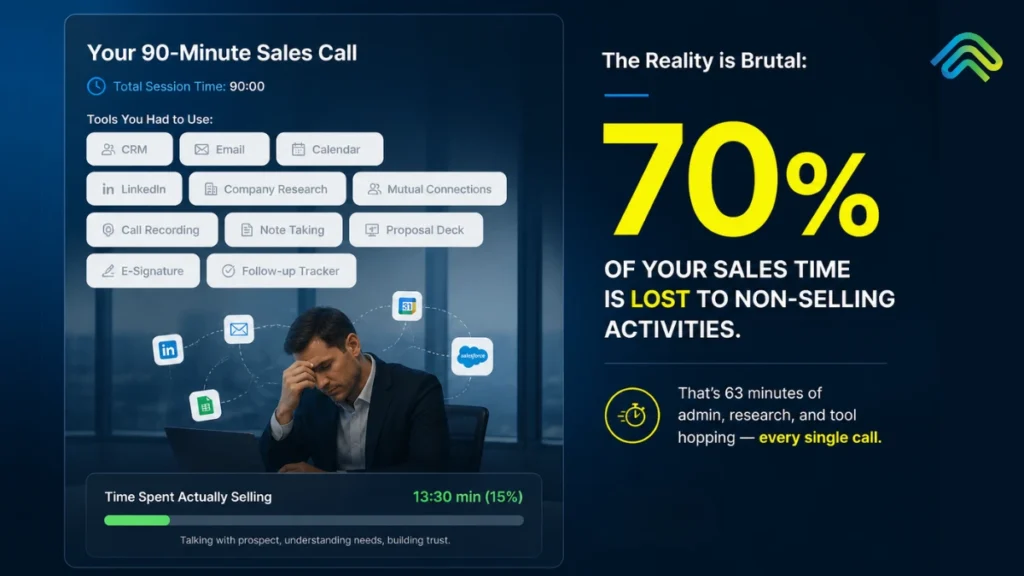
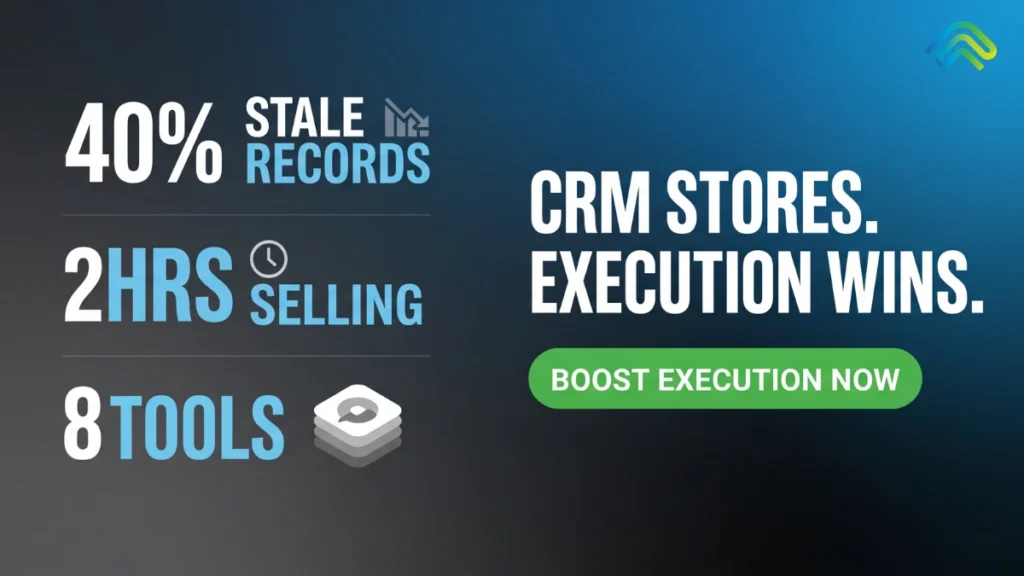
Your SDR has 11 tabs open: Salesforce, Outreach, LinkedIn Sales Navigator, ZoomInfo, Gong, Slack, Notion, Calendly, Salesloft, Apollo, and Chili Piper. They have been at their desk for 90 minutes. Total time spent actually selling: 14 minutes. This is not an edge case. It is the average workday for B2B sales reps in 2026. Salesforce’s State of Sales 2026 report found that reps spend only 30% of their week actually selling, with the rest consumed by admin work, data entry, and navigating platforms that were bought to speed things up. The average B2B sales team now uses 5 to 8 disconnected tools, while some enterprise teams run 12 or more.  Reps lose 2 or more hours every day just to context switching. Half of all sellers say they feel overwhelmed by the number of platforms required to do their job. And according to Gartner research, 30-50% of subscription costs are wasted on tools nobody actively uses. At SpurIQ, this post covers the following things: why tool sprawl got this bad, what it is actually costing your team, how to consolidate without breaking deals or losing capability, and the consolidation framework that works in 2026. What is Tool Sprawl? Tool sprawl is the excessive accumulation of disconnected software tools that create more friction than value, slowing down workflows instead of improving productivity. It is a system failure, not a headcount problem. It occurs when a sales tech stack grows without architectural intent, resulting in redundant data flows, broken handoffs, and integration debt that compounds with every new addition. When the cost of maintaining tool interoperability exceeds the value each tool contributes, the stack stops being an enabler and becomes operational overhead.  Furthermore, it is also worth separating tool sprawl from healthy stack growth. A team running five well-integrated tools with clean handoffs will outperform a team on three tools that cannot talk to each other. The number is not the issue. The architecture is. In 2020, the average B2B sales team ran on three or four tools. By 2026, that number has climbed to five to eight active tools for most teams, with enterprise orgs regularly peaking at twelve or more. The math compounds fast. Why did it happen? Every new pain point triggered a new vendor purchase. Outbound lagging? Add an intent data tool. Call quality low? Add a conversation intelligence platform. Pipeline visibility off? Add a forecasting layer. Nobody owned the stack as a whole, and slowly, one purchase at a time, teams built themselves into the mess they are now trying to get out of. According to Salesforce’s State of Sales report, 84% of sales teams without a consolidated platform are already planning to address their tech stack in the coming year, and 42% of reps say they feel overwhelmed by the number of tools required to do their job. That is not a technology problem. That is an architecture problem hiding inside a technology budget. The 5 Hidden Costs of Tool Sprawl  Most RevOps leaders can feel these costs. Few have added them up. Here is what tool sprawl is actually taking from your team. Cost 1: Lost Selling Time  As per SpurIQ research, reps spend roughly 70% of their day on non-selling tasks, leaving less than 30% for actual selling. That translates to about two hours of selling per day, with admin alone consuming roughly one of those hours. A mid-market AE can burn 45 minutes every morning just reconstructing yesterday across Gong, Outreach, Salesforce, and Apollo before typing a single word to a prospect. Cost 2: Data Silos  Customer data sits fragmented across five to eight disconnected systems with no real-time sync. The CRM does not see what Outreach sees. “Outreach” does not see what “Gong” heard. The manager sees nothing in real time.  According to Gartner, 49% of CSOs say their definition of a qualified lead differs greatly from marketing’s. That is not a strategy problem. That is a data problem.  Cost 3: Subscription Bloat  30% to 50% percent of tool spend is wasted on unused or duplicate-function tools. The average sales team is quietly carrying 2 to 3 ghost subscriptions, paying for tools no one actively uses. Those subscriptions accumulate silently, auto-renewing every quarter with no one watching the utilisation data.  One $4M ARR company found four overlapping enrichment tools running simultaneously, three of them at below 20% usage. According to Gartner, organisations that actively audit and optimise licenses cut software costs by 30% on average within the first year. Cost 4: Adoption Decay  Reps avoid tools they do not need to use, and the pattern is consistent: adoption rates for non-CRM tools routinely fall to 30 to 50% within six months of rollout. The rep stops logging in. The invoice does not stop arriving.  According to Salesforce’s 40 Sales Statistics 2026, 42% of reps already report feeling overwhelmed by too many tools, which means the new platform you rolled out last quarter is likely already on its way to becoming shelfware. Cost 5: Burnout and Quota Risk  According to our survey, 50% of sellers feel overwhelmed by tool count, and that overwhelm has a direct cost: overloaded reps are 45% less likely to hit quota.  Why Most Consolidation Advice Fails Most guides about tool sprawl tell you to rip out your stack and replace it with something cleaner. Buy the all-in-one. Standardise on one platform and shut everything else down. Problem solved. Except for one thing – it does not work. Here is why: Failure Mode 1: The All-in-One Trap Big platforms promise to do everything. And they do. Just not particularly well. For examples; HubSpot is a great marketing tool and a decent CRM. It is not a best-in-class sequencer. Salesforce is the system of record for most enterprise teams. It is not where your reps want to live their day. When you consolidate onto an all-in-one, you trade tool sprawl for capability gaps. Your team goes from too many mediocre handoffs to one platform that does most things adequately

Common CRM Problems
Revenue Operations, AI Strategy

The Death of Legacy CRM: Why Salesforce and HubSpot Are Losing the Revenue Execution War

“In the next era of B2B, the winners won’t be the ones with the best database, but the ones with the best process for acting on that database.”                                                              ~ Aaron Ross (Author of Predictable Revenue) A trader once said, “You can have all the ships, the maps, and the cargo. If you never sail, the port stays empty.” Today, the same story is playing out inside every B2B revenue team.  Revenue leaders are finally starting to admit a truth that has been whispered in boardrooms for years: their CRM is the most expensive address book in the company. B2B teams spend millions of dollars every year on Salesforce and HubSpot, yet an estimated 20 to 30% of potential revenue still leaks after the first buyer interaction. The tools are not broken. The problem is that they were never built for what matters most: execution. CRM systems were designed to record relationships, log calls, and track deals. In 2026, deals are not lost because of missing data. They are lost because no one acted on the data that was already there. People had notes, timelines, and contact history. They just never turned that information into timely, coordinated actions. This signals a massive shift in the market. CRM is not necessarily dying; it has evolved. The real power in the tech stack is moving to the Execution Layer that sits above the database. Legacy CRMs are losing the war because they are trying to solve an execution problem with a storage solution. How Salesforce and HubSpot Became the Center of Every Sales Org (And Why That Era Is Over) Twenty years ago, customer data lived in a hundred places: spreadsheets, email threads, sticky notes, and hazy memory. Then Salesforce came along and said, ‘’Put it all in one place.’’ Slowly but surely, it became the default system that every serious sales organization was expected to run on. The promise was to give every rep a single source of truth, and your team would finally see the whole pipeline, not just a fragmented view.  HubSpot followed a similar path but with a different mission. While Salesforce leaned into the enterprise, HubSpot focused on SMBs and marketers. It offered a free CRM as a gateway to its marketing‑first stack, then built workflows that let growing teams track leads, touch points, and revenue in one interface. Within a few years, what started as a marketing tool quietly became a core CRM for thousands of companies. At first, this was a clear win. Centralized data helped leaders see pipelines, forecast revenue, and measure performance in ways that simply weren’t possible before. But somewhere along the way, the magic faded. What was built as a system of action turned into a system of record: a place reps updated because leadership demanded it, not because it helped them close. The very thing meant to drive revenue became the chore no one wanted to do. One revenue‑focused discussion put it clearly: “The CRM is not broken; your process is. You built a system to track leads, but you never built a system to follow up on them.” In that gap, the problems of CRM deepen: incomplete entries, missing context, and forecasts that feel like hopeful guesses rather than grounded predictions. That’s the quiet reality of the Salesforce‑and‑HubSpot era. They succeeded in becoming the center of the sales org, and in doing so, they also became the center of friction. What started as a solution to the common CRM problems of the early 2000s, over time, has become a legacy CRM that is no longer enough for the execution-first world of 2026. That’s how the era where CRM was the undisputed center is ending! The power is shifting now.  5 Core Reasons Why Businesses Are Leaving Legacy CRMs in 2026 In the early days of enterprise software, management thinker Peter Drucker said, “You can’t manage what you can’t measure.” For decades, CRM systems have given teams the ability to measure. However, the 2026 update is that you can’t execute what you don’t automate.  That’s because businesses are realizing that knowing where every lead sits is no longer enough. Visibility isn’t the real challenge; it’s turning that visibility into coordinated and timely action. Legacy CRM systems were built to answer the question “What happened?” But B2B revenue teams are asking a new question: “What should happen next, and who is responsible for it?” Simply put, legacy CRM systems are not dying because they are broken. They are being replaced because they were built for a world that no longer exists. As B2B selling becomes more complex, distributed, and signal-driven, the old playbook starts to crack. Here are five reasons teams are quietly moving away from Salesforce and HubSpot as their revenue core: Failure 1: Data Graveyards, Not Decision Engines Legacy CRMs are fantastic at collecting data. They log calls, store notes, track stages, and centralize customer history. But they rarely turn that data into decisions. In practice, this looks like a rep opening a spreadsheet every morning and sorting leads by hand because the CRM doesn’t surface what really matters. Here’s how that gap usually shows up: Case Studies in the AI‑CRM space show that modern systems that surface intent signals can cut rep analysis time by 50–60% compared to traditional CRM‑only workflows. As a Revenue Ops podcast host once put it, ‘You’re not paying for data. You’re paying for the ability to act on it. If your CRM doesn’t tell you what to do next, it’s a data graveyard, not a decision engine.’ This is one of the biggest problems with CRM: rich data, weak action.  Failure 2: Manual Hygiene Dependency The quality of your CRM data rests almost entirely on your reps tying the right fields at the right time. That’s a tough bet. CRM deployment landscapes suggest that 40-60% of CRM records are incomplete or stale at any given time. Meaning that, half of your pipeline, give or take, is built on guesswork, not facts. And, forecasts based

Buying Signals vs Intent Data
Revenue Operations, AI Strategy

Buying Signals vs Intent Data: What Actually Triggers a Sale in 2026

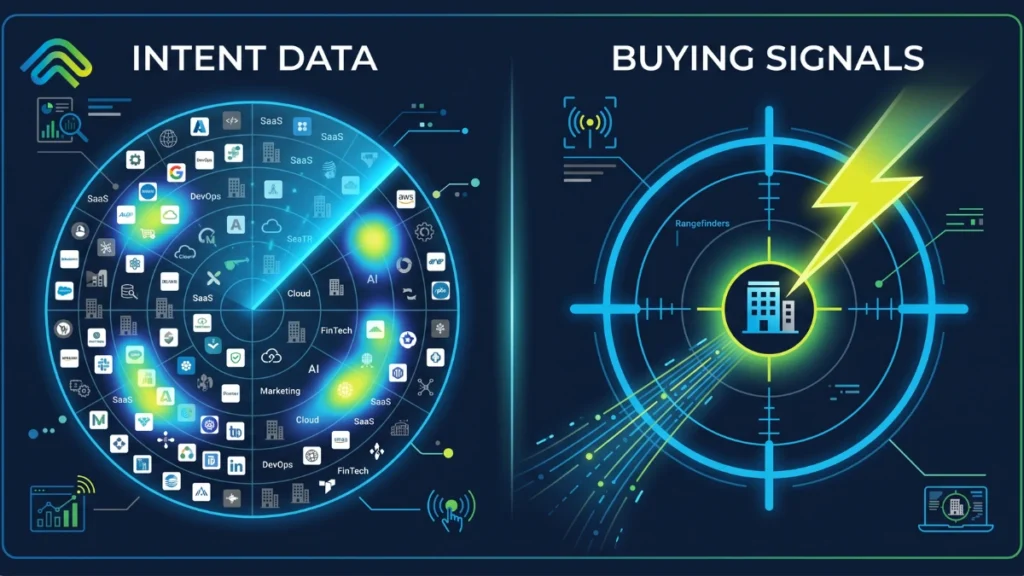
Most sales leaders have everything in line: Bombora for intent; ZoomInfo for contact information; a CRM system full of behavioral data. And still, the pipeline is empty. If you look closely, most sales reps are cold-calling accounts that haven’t responded in 3 months. Simply, the timing of the outreach is just wrong! Even after having all essential and relevant data – what’s the result? Missed quarters. Longer sales cycles. Reps are burning out on effort that never converts. The problem is not a shortage of data. The problem is that most B2B sales teams treat buying signal and intent data as interchangeable. But, they are not. One tells you where to look. The other tells you when to move. Confuse between these two, and it is impacting your overall quarter sales. You are guessing in a well-dressed spreadsheet (in the era of Artificial Intelligence).  While you can efficiently use buying signals and intent data together to increase your overall revenue. This guide draws a clean line between the two and shows how modern B2B revenue teams are using them together to build a faster, more predictable pipeline in 2026. What are Buying Signals in Sales?  A buying signal is a real, measurable action or behavioral shift in a target account that indicates a prospect may be moving toward a purchase decision. To understand what makes these signals valuable, it helps to look at the level of certainty they provide. The key idea here is clarity. A buying signal is not a hunch or an account simply “looking active.” It is a concrete event that has already happened.  For example, a decision-maker visiting your pricing page multiple times, a company announcing a new funding round, or a new VP of Sales joining and likely re-evaluating tools. These signals indicate that priorities are shifting and a buying window may have just opened. For a seller who is paying attention, this creates a clear and time-sensitive opportunity to act. What is B2B Intent Data in Sales?  B2B intent data is behavioral information collected about companies based on their online research activity. It captures the digital trail a business leaves behind when employees research topics, compare vendors, read review content, or consume educational material related to your product category.  There are two types worth knowing:  1. First-Party Intent Data  First-party intent data is generated from your own digital properties. It is reliable because it reflects direct interaction with your brand. You own it, you can act on it immediately, and there is no middleman interpreting it for you.  Common first-party signal sources include: 2. Third-Party Intent Data  Third-party intent data is aggregated from external sources that track which companies are engaging with relevant topics across thousands of properties. When a cluster of employees at a target account starts consuming content around “sales automation” or “CRM integration,” that creates a third-party intent surge worth paying attention to.  Some of the most significant third-party signal sources include: The Leading Intent Data Vendors  When evaluating the best intent data providers, most B2B teams rely on a mix of trusted platforms. The honest limitation of intent data:  It is probabilistic. It tells you someone at a company has been researching a topic. It does not tell you who, what their budget looks like, whether they hold any authority, or how close they are to a decision. That gap is exactly where buying signals become essential.  What is the Difference Between Buying Signal and Intent Data?  Intent data tells you who might be interested. On the other hand, buying signals tell you what just happened and why you should be on the phone right now. Intent data is probabilistic. It is built from patterns of content consumption across publisher networks, review sites, and third-party content hubs. It flags that something might be happening within an organization, but it does not confirm that a decision has been made, a budget has been approved, or that the person conducting the research has any buying authority.  On the other hand, buying signals are deterministic. A new VP of Sales joining, a funding round closing, and a competitor’s contract lapsing. These are facts, not patterns. They tell you a window just opened, and that window closes fast. Research shows that vendors who reach out to a newly funded company within 48 hours see conversion rates four times higher than those who wait. There is also a critical identity gap most teams ignore.  Intent data tells you the company, not the person. A topic surge at a 2,000-person enterprise confirms that someone inside is researching your category, but it stops there. You do not know if it is the CFO evaluating a budget shift or an intern writing a market report.  Buying signals cut through that ambiguity. A named decision-maker visiting your pricing page three times this week is not a pattern. It is a person with a clear intent you can act on today. The table below draws the line: Factor Buying Signals Intent Data Nature Deterministic: something happened Probabilistic: something might be happening Buyer Stage Mid-to-late funnel Early funnel Actionability Act within hours Needs scoring and interpretation first Identity Contact or company-specific Account-level, often anonymous Risk if Used Alone Misses the early pipeline Creates noise; many accounts are not ready But here is what most comparison guides miss: neither intent data nor buying signals create revenue on their own. They create opportunity. What happens in the next 15 minutes decides whether that opportunity becomes a pipeline or leaks. So, you must be quick with your execution to actually move forward the revenue. Why Buying Signals Matter to Modern B2B GTM Teams  Here is a hard truth most sales leaders already feel but rarely say out loud: by the time a prospect fills out your demo form, you are probably already too late. Gartner research confirms that B2B buyers spend only 17 percent of their total buying time in direct contact with potential vendors, meaning 80 percent of the journey happens entirely

lead response time
Revenue Operations, AI Strategy

Speed-to-Lead in 2026: Why Response Time Still Wins (And How AI Fixes It)

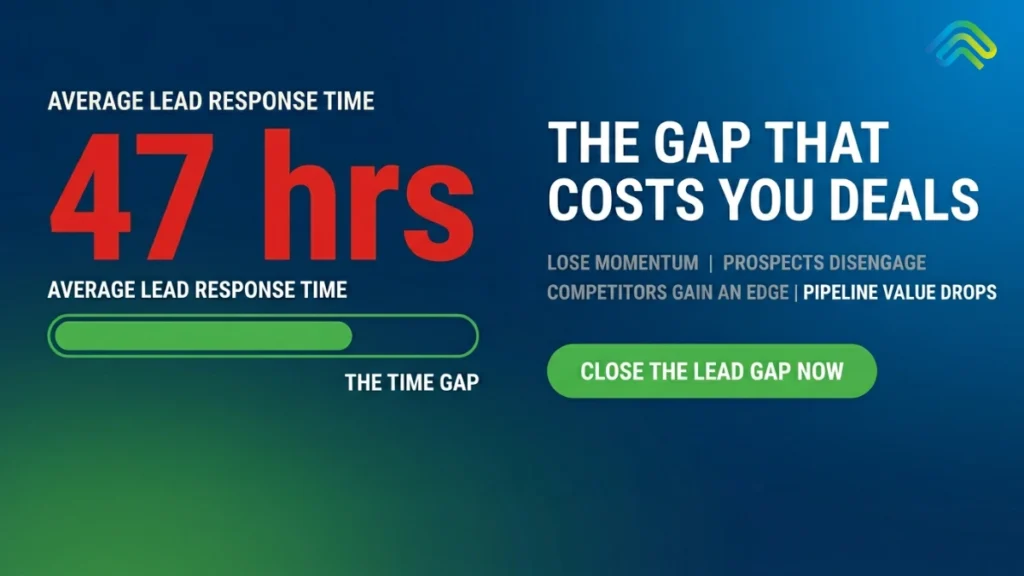
Speed-to-lead in 2026 is still the simplest and most overlooked predictor of revenue performance. It’s Monday morning. You sit down with your coffee, log into your CRM, and see the damage: there are 47 demo requests from the weekend sitting untouched. The oldest one came in on Friday evening. It was a VP of Operations filling out your high-intent form while actively comparing three different vendors. That was 63 hours ago. By the time your SDR sends the first “Just following up” email, she’s already taken two meetings and signed a contract with a competitor. Everyone in B2B sales knows that speed-to-lead matters. It is not a new concept. The data proving that faster response times equal higher conversion rates has been consistent for more than 15 years. And yet, the reality on the ground is astonishing: the average B2B lead response time is still 47 hours, according to the Optifai 2026 Pipeline Study. Only 23% of companies manage to respond within 5 minutes, while a staggering 63% never respond to an inbound lead at all. In this guide, we are going to break down exactly what is happening. We will share the 2026 data that proves why response time still dictates who wins the deal. We will unpack the structural, systemic reasons most revenue teams fail at this despite knowing better. Finally, we will show you how AI-driven revenue execution finally fixes this gap – not by hiring a massive army of new SDRs, but by fundamentally owning the signal-to-action moment. What Is Speed-to-Lead? (And What It Really Measures) If you ask ten sales leaders, “What exactly does ‘speed to lead’ mean?”, you might get ten slightly different answers. Let’s define it in plain, operational language. Speed-to-lead is the exact measurement of time between a prospect submitting an lead form (such as a demo request, a contact form, a pricing enquiry, or a chat initiation) and the moment your sales team makes their first deliberate contact with that prospect by phone, email, or direct messaging. To build a system that works, it is crucial to distinguish speed-to-lead from other related metrics that often get incorrectly lumped together: Most importantly, you have to understand what speed-to-lead actually measures. It does not measure how fast an individual human can type an email. It measures execution discipline. If you achieve a 5-minute response time, it means your entire pipeline machinery – the form submission, the routing logic, the data enrichment, the rep notification, the rep availability, and the first dial – worked flawlessly end-to-end in under 300 seconds. A 47-hour response time means that pipeline broke somewhere along the way, or most likely multiple times. The 2026 Speed-to-Lead Statistics That Should Terrify You If you think your team is immune to the speed-to-lead problem, the industry benchmarks tell a different story. The data for 2026 is unambiguous. When we look at speed to lead statistics, they group naturally into three terrifying narratives: how teams actually perform, what that performance costs in revenue, and what modern buyers expect. The Performance Gap: What Teams Actually Deliver We have more sales technology than ever before, yet our baseline execution remains shockingly slow. The Revenue Impact: What Speed-to-Lead Is Actually Worth  Every minute a lead sits in a queue, the probability of closing that deal plummets. How does speed to lead impact revenue generation? The Expectation Gap: What Buyers Now Demand The consumerization of B2B is complete. Buyers no longer tolerate the “we will get back to you in 1-2 business days” auto-responder. Why Most Teams Fail – And Why It’s Structural, Not Motivational When leaders see the data above, the initial reaction is usually to call a high-urgency sales meeting, yell at the SDR team, and demand they move faster. But this is the wrong approach. The failure is not motivational; it is entirely structural. Speed-to-lead can’t be fixed with a pep talk. To understand why deals decay in a B2B pipeline, we have to look at the five structural failure modes of modern sales environments. Failure Mode 1: Reps Don’t Have 5 Minutes The modern SDR is drowning in administrative tasks. Studies show that SDRs spend only 30% of their actual workday on active selling. The other 70% goes to manual CRM updates, internal meetings, account research, and inbox management. Even the most highly motivated rep cannot physically respond to an inbound demo request in 5 minutes if they are buried inside Salesforce, manually logging detailed notes from their previous discovery call. Speed-to-lead isn’t failing because your reps don’t care. It’s failing because the system they work inside is not built for speed. Failure Mode 2: Routing Logic Breaks When a lead arrives, a massive amount of invisible logic has to execute perfectly. The lead needs to be enriched with external data, scored for qualification, assigned to the correct geographic or vertical territory, and finally routed to a rep who is actually online and available. If even one step breaks – perhaps a routing rule relies on stale territory logic, or the assigned rep is out sick, or an enrichment API times out – the lead drops into a holding queue. Companies with a rigorously defined SLA respond within 15 minutes at nearly double the rate of those without (54.9% vs 29.5%, Blazeo 2026). But in most companies, these SLAs exist on a PDF, not in the actual routing infrastructure. Failure Mode 3: Data Quality Kills Speed Imagine achieving a 3-minute response time, only to dial a disconnected phone number and send an email that hard-bounces. A 5-minute response to a bad record is a 5-minute response to nobody. Currently, 20–35% of B2B contact records contain outdated or entirely incorrect information. Every time a rep rushes to follow up on a bad record, it burns their time and their motivation. Consequently, the next lead in the queue gets less energy and urgency than the last. Fast execution on terrible data is not a strategy. Failure Mode 4: After-Hours and Weekends As noted in

Scroll to Top