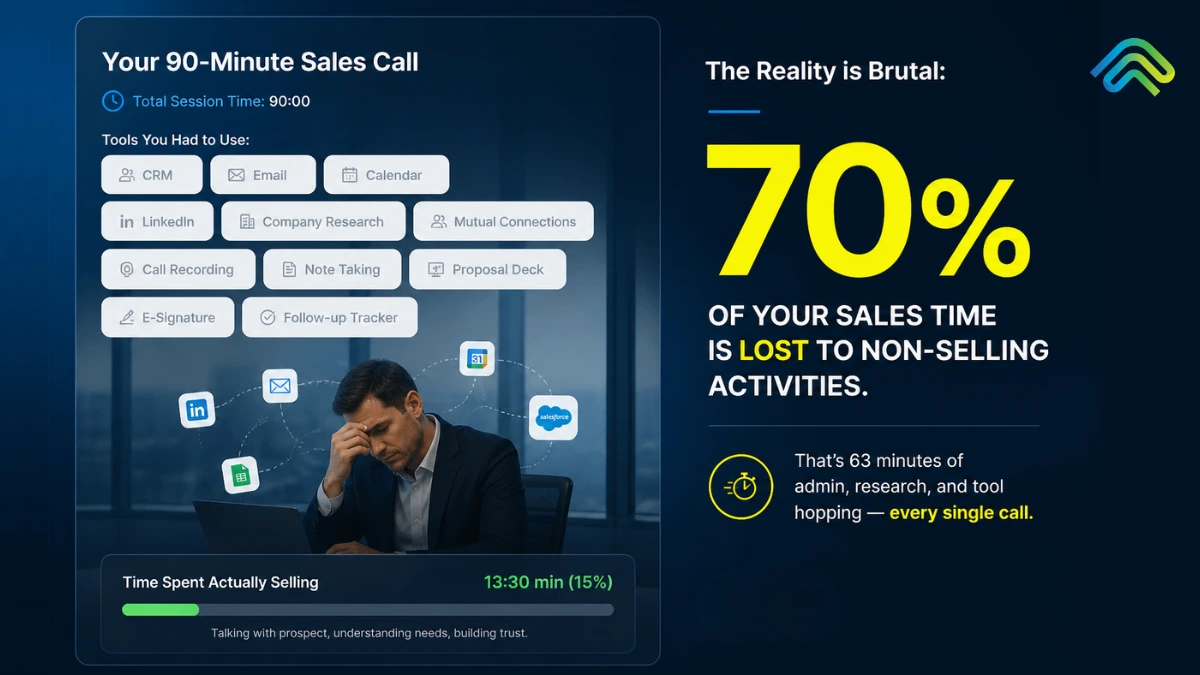
Your SDR has 11 tabs open: Salesforce, Outreach, LinkedIn Sales Navigator, ZoomInfo, Gong, Slack, Notion, Calendly, Salesloft, Apollo, and Chili Piper. They have been at their desk for 90 minutes. Total time spent actually selling: 14 minutes.
This is not an edge case. It is the average workday for B2B sales reps in 2026.
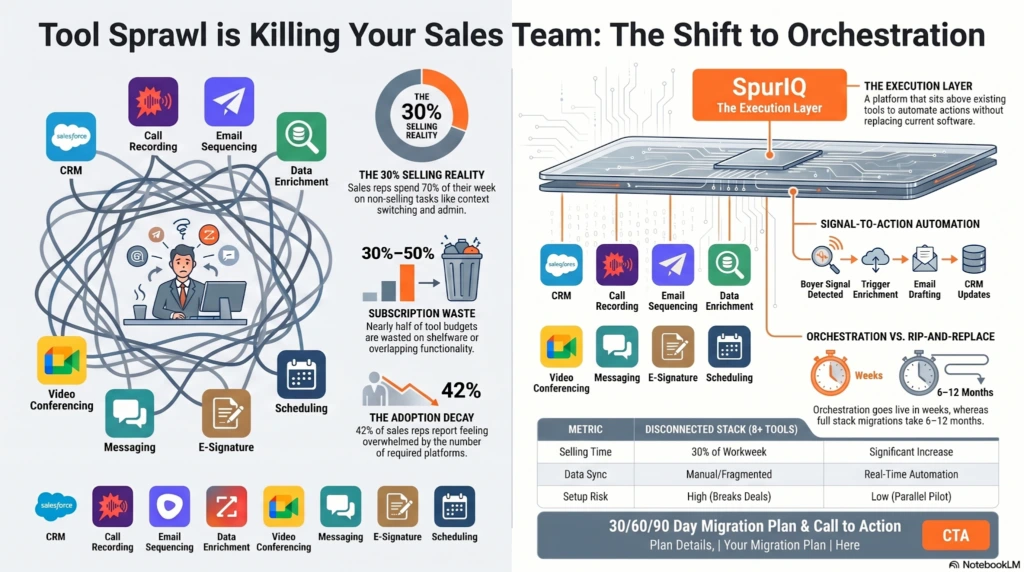
Salesforce’s State of Sales 2026 report found that reps spend only 30% of their week actually selling, with the rest consumed by admin work, data entry, and navigating platforms that were bought to speed things up. The average B2B sales team now uses 5 to 8 disconnected tools, while some enterprise teams run 12 or more.
Reps lose 2 or more hours every day just to context switching. Half of all sellers say they feel overwhelmed by the number of platforms required to do their job. And according to Gartner research, 30-50% of subscription costs are wasted on tools nobody actively uses.
At SpurIQ, this post covers the following things: why tool sprawl got this bad, what it is actually costing your team, how to consolidate without breaking deals or losing capability, and the consolidation framework that works in 2026.
What is Tool Sprawl?
Tool sprawl is the excessive accumulation of disconnected software tools that create more friction than value, slowing down workflows instead of improving productivity.
It is a system failure, not a headcount problem. It occurs when a sales tech stack grows without architectural intent, resulting in redundant data flows, broken handoffs, and integration debt that compounds with every new addition. When the cost of maintaining tool interoperability exceeds the value each tool contributes, the stack stops being an enabler and becomes operational overhead.
Furthermore, it is also worth separating tool sprawl from healthy stack growth. A team running five well-integrated tools with clean handoffs will outperform a team on three tools that cannot talk to each other. The number is not the issue. The architecture is.
In 2020, the average B2B sales team ran on three or four tools. By 2026, that number has climbed to five to eight active tools for most teams, with enterprise orgs regularly peaking at twelve or more. The math compounds fast.
Why did it happen? Every new pain point triggered a new vendor purchase. Outbound lagging? Add an intent data tool. Call quality low? Add a conversation intelligence platform. Pipeline visibility off? Add a forecasting layer. Nobody owned the stack as a whole, and slowly, one purchase at a time, teams built themselves into the mess they are now trying to get out of.
According to Salesforce’s State of Sales report, 84% of sales teams without a consolidated platform are already planning to address their tech stack in the coming year, and 42% of reps say they feel overwhelmed by the number of tools required to do their job.
That is not a technology problem. That is an architecture problem hiding inside a technology budget.
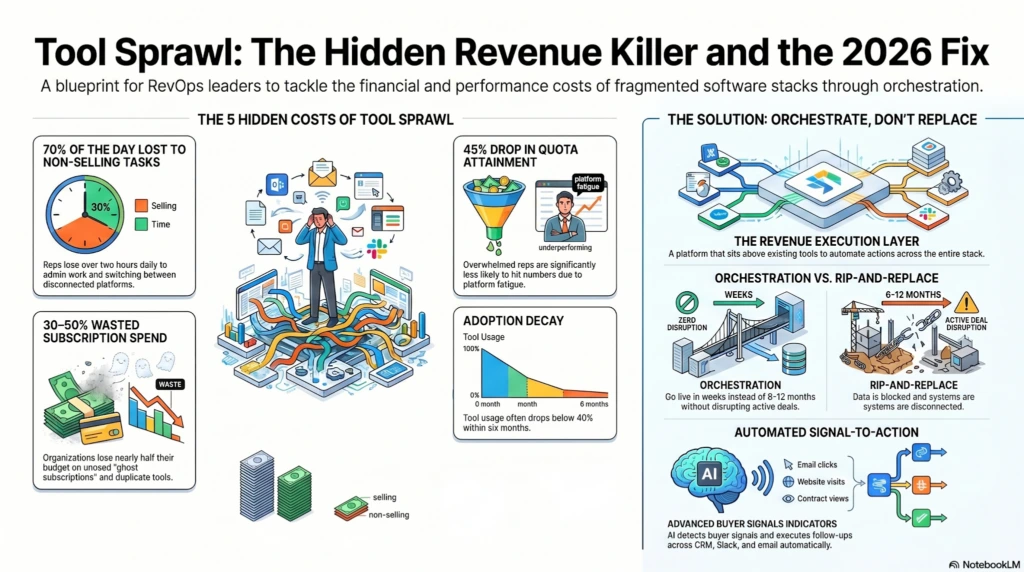
The 5 Hidden Costs of Tool Sprawl
Most RevOps leaders can feel these costs. Few have added them up. Here is what tool sprawl is actually taking from your team.
Cost 1: Lost Selling Time
As per SpurIQ research, reps spend roughly 70% of their day on non-selling tasks, leaving less than 30% for actual selling. That translates to about two hours of selling per day, with admin alone consuming roughly one of those hours. A mid-market AE can burn 45 minutes every morning just reconstructing yesterday across Gong, Outreach, Salesforce, and Apollo before typing a single word to a prospect.
Cost 2: Data Silos
Customer data sits fragmented across five to eight disconnected systems with no real-time sync. The CRM does not see what Outreach sees. “Outreach” does not see what “Gong” heard. The manager sees nothing in real time.
According to Gartner, 49% of CSOs say their definition of a qualified lead differs greatly from marketing’s. That is not a strategy problem. That is a data problem.
Cost 3: Subscription Bloat
30% to 50% percent of tool spend is wasted on unused or duplicate-function tools. The average sales team is quietly carrying 2 to 3 ghost subscriptions, paying for tools no one actively uses. Those subscriptions accumulate silently, auto-renewing every quarter with no one watching the utilisation data.
One $4M ARR company found four overlapping enrichment tools running simultaneously, three of them at below 20% usage. According to Gartner, organisations that actively audit and optimise licenses cut software costs by 30% on average within the first year.
Cost 4: Adoption Decay
Reps avoid tools they do not need to use, and the pattern is consistent: adoption rates for non-CRM tools routinely fall to 30 to 50% within six months of rollout. The rep stops logging in. The invoice does not stop arriving.
According to Salesforce’s 40 Sales Statistics 2026, 42% of reps already report feeling overwhelmed by too many tools, which means the new platform you rolled out last quarter is likely already on its way to becoming shelfware.
Cost 5: Burnout and Quota Risk
According to our survey, 50% of sellers feel overwhelmed by tool count, and that overwhelm has a direct cost: overloaded reps are 45% less likely to hit quota.
Why Most Consolidation Advice Fails
Most guides about tool sprawl tell you to rip out your stack and replace it with something cleaner. Buy the all-in-one. Standardise on one platform and shut everything else down. Problem solved.
Except for one thing – it does not work. Here is why:
Failure Mode 1: The All-in-One Trap
Big platforms promise to do everything. And they do. Just not particularly well. For examples; HubSpot is a great marketing tool and a decent CRM. It is not a best-in-class sequencer. Salesforce is the system of record for most enterprise teams. It is not where your reps want to live their day. When you consolidate onto an all-in-one, you trade tool sprawl for capability gaps. Your team goes from too many mediocre handoffs to one platform that does most things adequately and nothing exceptionally.
Failure Mode 2: Mid-Quarter Rip-and-Replace
Nobody is migrating their sales stack in the middle of Q2 when there is a number to hit. A rip-and-replace consolidation project takes 6 to 12 months. It breaks active deals during the transition. Reps lose pipeline visibility. Forecasts stop being reliable. And when the quarter ends badly, the consolidation project gets blamed.
Failure Mode 3: Consolidating Around the Wrong Layer
Most teams focus their consolidation energy on the CRM. Replace the CRM, the thinking goes, and the rest will follow. But the CRM is not where the breakdown is happening. The CRM is the record. The breakdown happens in execution: The CRM is not the bottleneck. The layer above it, where execution and orchestration happen, is where the gap lives. Fixing the record-keeping layer does not fix the execution layer.
Failure Mode 4: Vendor Lock-In
Buying a single mega-platform feels like consolidation. What it actually is is dependency. When that vendor raises prices, changes their roadmap, or gets acquired, you have no leverage. You built your entire go-to-market motion around one vendor’s product decisions. That is not a stack. That is a hostage situation.
The better approach is not fewer tools. It is the right architecture.
5-Step Consolidation Audit Framework 2026
Before you make any changes to your stack, you need to know what you are actually working with. So, you can conduct this five step consolidation audit regardless of whether you are a 15-person startup or a 300-person sales org. This way, you’ll have a better picture of what needs to be changed or adapted. Let’s get started with the framework:
Step 1: Inventory the Actual Stack
Pull every subscription. Include the tools that individual reps signed up for on a free trial that quietly became a paid plan. Include the tool someone’s previous manager bought two years ago that still gets charged to the company card. Include shadow IT.
As per what we’ve observed across industries, most teams discover 30 to 40% more tools than they thought they had. This step alone is usually a wake-up call.
Step 2: Map Function to Tool
List every job-to-be-done in your sales motion, including Prospecting, Enrichment, Sequencing, Call recording, Forecasting, Pipeline management, and Meeting scheduling. Map each job to the tool that owns it. Then look for duplicates (two tools doing the same job) and orphans (jobs that no tool owns consistently).
Step 3: Audit Usage and Adoption
Pull login data, utilisation, and feature-level usage if your vendors provide it. Any tool sitting below 40% active adoption is a candidate for the chopping block, or at minimum, a serious conversation with the team about why they are not using it.
Step 4: Identify the Integration Gaps
This is the most valuable step and the one most audits skip. Where are reps re-entering data manually? Where do handoffs break between tools? Where does the CRM go stale because nobody has time to update it? These gaps are where your revenue is actually leaking. They cost more than any single tool subscription.
Step 5: Decide, Replace, and Retain
For each tool, you have three options. Replace tools that genuinely duplicate function with something else you already have. Retain tools that deliver unique value but live in silos. And for the gaps between retained tools, orchestrate rather than replace. This third option is where most consolidation projects miss the opportunity.
A Better Approach: Orchestrate, Don’t Replace
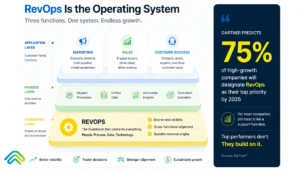
The problem was never the number of tools. It was always the space between them ie (Signal to action gap).
The Execution Layer Concept
Every tool in your sales stack was built to do one specific job well. “Outreach” owns sequencing. “Gong” owns call intelligence. “ZoomInfo” owns data enrichment. “Salesforce” owns records. None of them owns what happens in between those jobs.
That in-between space is where revenue execution either happens or breaks down. It is where a signal detected in one tool should trigger an action in another, automatically, without a rep having to play air traffic controller across eleven tabs.
You can read more about how this gap compounds over time in The Signal-to-Action Gap in B2B GTM Stacks.
The execution layer sits above your existing sales stack. It reads signals from any tool. It decides what the next best action is. And it executes that action across the right tools without anyone having to manually connect the dots. Basically this happens through ai revenue action orchestration.
Here is a concrete example of what that looks like in practice:
A buyer visits your pricing page. Clearbit detects the signal. The execution layer enriches the contact through ZoomInfo, drafts a contextual email, routes it through Outreach, logs the activity in Salesforce, and alerts the rep in Slack. All of that happens in under 15 minutes. The rep’s job is to review and send, not to manually coordinate across five platforms.
No new tab opened. No data re-entered. No follow-up was missed because the timing fell through the cracks.
Why Does This Beats All-in-One?
You keep the tools your team already knows. Adoption stays high because nothing changes about how reps interact with Gong, Outreach, or Salesforce. You do not lose specialised capability. Gong stays best at calls. Salesforce stays in your system of record. Outreach stays your sequencer.
You eliminate the gap between tools, which is where the actual revenue leaks happen. The signal-to-action gap closes automatically rather than relying on reps to manually bridge it. You consolidate workflow, not vendors. Reps experience something that feels like consolidation: one place where actions get decided and executed, without a single deal being disrupted.
This is the architecture SpurIQ is built around. SpurIQ is a revenue execution platform that sits on top of your existing GTM stack (Salesforce, HubSpot, Outreach, Gong, Apollo, Slack) and orchestrates execution across all of them.
Lead IQ handles signal-led outbound execution: detect the signal, enrich the contact, draft the message, and route it through your existing sequencer. Deal IQ handles deal follow-through: surface stalling deals, draft re-engagement, update CRM, and alert managers.
No tools to remove. No deals to migrate. No team to retrain. Just execution that finally happens, across the stack you already paid for.
See how the platform works or book a demo.
The 4 Ways to Fix Tool Sprawl
When it comes to fixing tool sprawl, there are four distinct approaches on the market. Here is an honest breakdown of each.
| Approach | What It Looks Like | Best For | Common Vendors |
| Point Solutions | Best-of-breed tools, each owning one job | Mature teams with strong RevOps and integration budget | Outreach, Gong, ZoomInfo, Apollo, Clearbit |
| All-in-One Platforms | One vendor, many features, deep lock-in | Smaller teams prioritising simplicity over capability | HubSpot, Salesforce, Pipedrive |
| AI Revenue action Orchestration / Execution Layer | Sits on top of the existing stack, executes across tools | Teams with sprawl who need consolidation without rip-and-replace | SpurIQ |
| No-Code Glue / iFrames | Workflow tools connecting tools manually via triggers | Tactical patches, not strategic execution | Zapier, Workato, n8n |
None of these approaches is universally right. The right choice depends on your team’s size, RevOps maturity, and tolerance for transition risk. But if you are a team with a working stack that has sprawl problems, the execution layer model is worth a serious look before you spend six months migrating to an all-in-one that will leave capability gaps.
The 30/60/90 Migration Plan
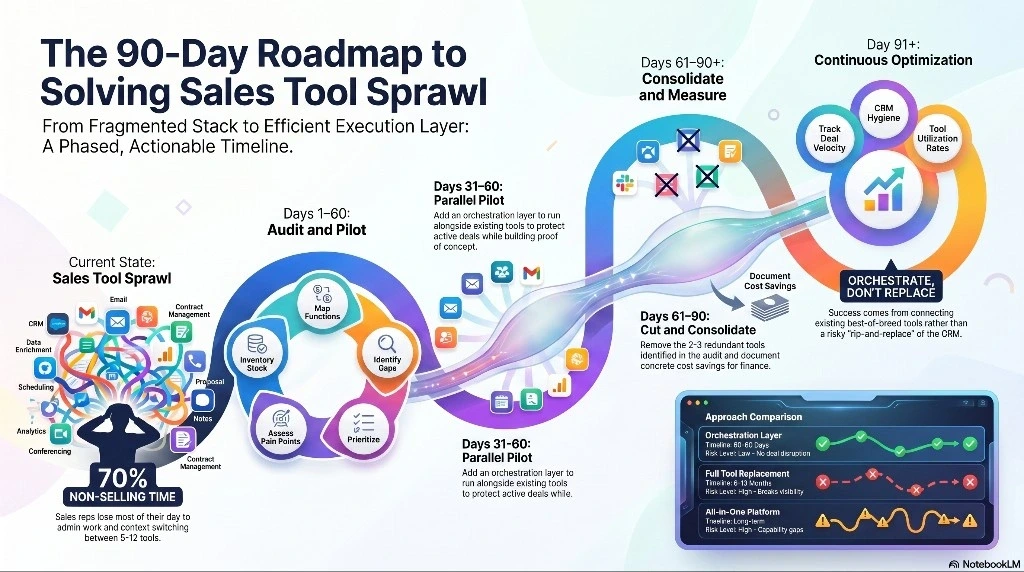
If you really want to fix your tool sprawl without risking to change your entire current tool stack, here is a realistic phasing plan that can help you add orchestration later without blowing up your current quarter.
Days 1 to 30: Audit and Plan
Run the SpurIQ’s specialized 5-step audit mentioned above in detail. Let us tell you in short: Pull every subscription. Map every function. Identify the three highest-pain gaps in your current execution flow. By day 30, you should have a clear picture of what to replace, what to retain, and where the orchestration layer will close the gaps.
Days 31 to 60: Pilot
Add the revenue orchestration layer. Do not cut anything yet. Run parallel with your existing tools for 30 days and measure the difference. Track time-to-first-action, CRM hygiene rates, and rep sentiment. This parallel period protects active deals while building the proof of concept.
Days 61 to 90: Cut and Consolidate
Once the orchestration layer has proven its value, cut the two or three tools that genuinely became redundant. Document the workflow improvements with concrete numbers. Bring that documentation to finance when you renew. This is where the cost savings show up on paper.
Day 91 and Beyond: Measure Continuously
Re-audit quarterly. Track time-to-first-action, deal velocity, CRM hygiene rate, and rep utilisation. Healthy stacks need maintenance, not just one-time surgery.
The Bottom Line
Tool sprawl is real. But the cure most blogs prescribe (ripping out your stack and starting over) is more disruptive than the disease itself. Consolidation projects that go the rip-and-replace route take 6 to 12 months, break active deals, and collapse forecast visibility right when you can least afford it.
The teams winning in 2026 are not buying fewer tools. They are adding the execution layer that makes their existing tools work together the way they were always supposed to. Less time context-switching. More time selling. Fewer gaps between signals and actions. Faster deal cycles.
The fix is not a smaller stack. It is a smarter architecture.
SpurIQ sits on top of the stack you already have. See how the execution layer works at spuriq.ai/demo.
Frequently Asked Questions (FAQs):
What is tool sprawl in sales?
Tool sprawl in sales is the growing pile-up of disconnected, highly specialized tools that, instead of improving productivity, start slowing teams down. Each tool may solve a small problem, but together they create friction, confusion, and inefficiency.
What this looks like in reality:
– Most B2B sales teams today use 5 to 8 tools on average
– Reps lose 2+ hours daily just switching between tools
– Around 30–50% of tool spend goes to unused or overlapping software
When managing the stack takes more effort than actually selling, it’s a clear sign you’re dealing with tool sprawl.
How many sales tools are too many?
There’s no strict “magic number,” but patterns are pretty clear. Most teams start feeling the pain once their stack grows beyond a manageable structure.
General benchmarks:
– 5–8 tools → Normal range
– 8+ tools without integration → High risk of sprawl
– Disconnected tools → Bigger issue than the number itself
In simple terms, five tools that work well together will always outperform eight tools operating in silos.
What is the best way to consolidate sales tools?
In 2026, the smartest approach isn’t ripping everything out – it’s connecting what you already have. Full replacements sound appealing, but often create more disruption than value.
A better approach:
– Add an orchestration layer over your existing stack
– Avoid disrupting active deals or retraining teams
– Close execution gaps quickly (often within weeks)
Replacing tools mid-cycle can take 6–12 months, while orchestration delivers faster results with far less risk.
Do I have to replace my CRM to fix tool sprawl?
No. The CRM is rarely the problem. It is the execution layer above it where breakdowns actually happen. Instead of replacing your CRM, consider adding a revenue execution platform like SpurIQ that sits on top of it and automates the handoffs between your existing tools.
SpurIQ is built specifically for this: it connects to Salesforce or HubSpot and orchestrates execution across your stack without replacing anything.
How long does consolidation take?
The timeline depends entirely on the approach you choose.
Typical timelines:
Orchestration layer:
– Go live in a few weeks
– Results in 60–90 days
Full tool replacement:
– Takes 6–12 months
– High disruption risk
If speed and continuity matter (which they usually do in sales), orchestration is the more practical path.
How does AI help reduce tool sprawl?
AI changes the game by removing the need for constant manual coordination between tools. Instead of reps doing the work of connecting systems, AI revenue action orchestration handles it in the background.
What AI revenue action orchestration does:
– Detects buying signals automatically
– Decides the next best action
– Executes actions across tools in real time
– Eliminates tab-switching and manual follow-ups
The result? Reps spend less time managing tools and more time actually selling, exactly where their impact matters most.